Porta potty route & scheduling software
Group recurring service, pickups, deliveries, and repairs by day and truck.
Magic Lav
Plan routes by truck and day, dispatch drivers, and track every restroom unit and supply. Free 2-week trial — plans from $99/mo.
Card required to start — you won't be charged until day 15. Cancel anytime.
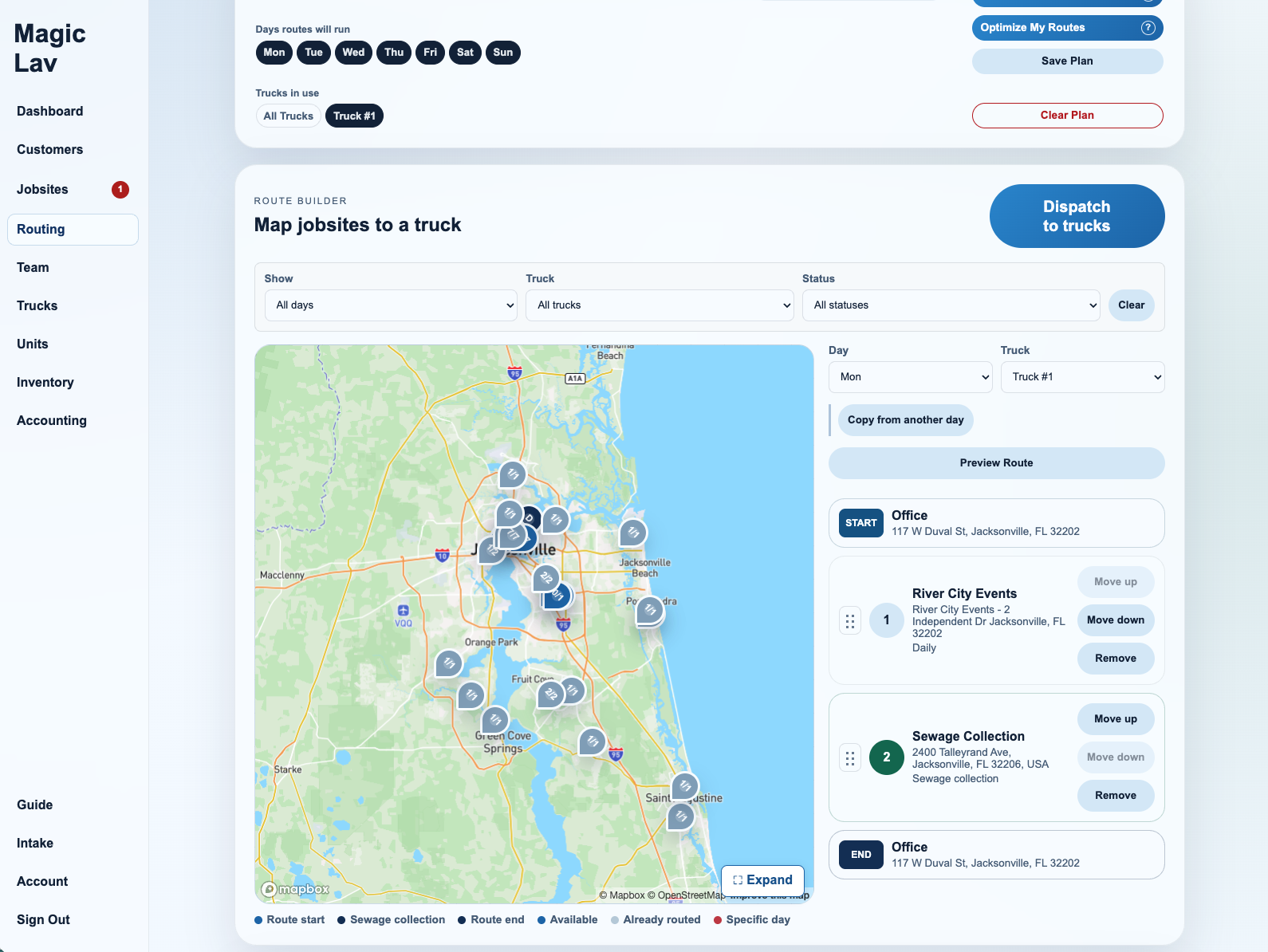
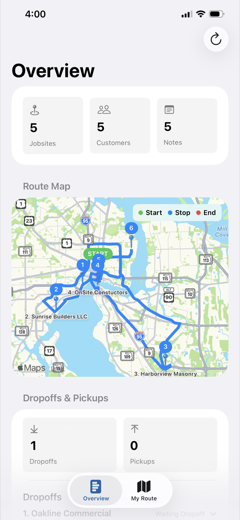
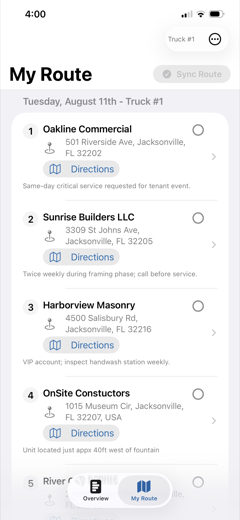
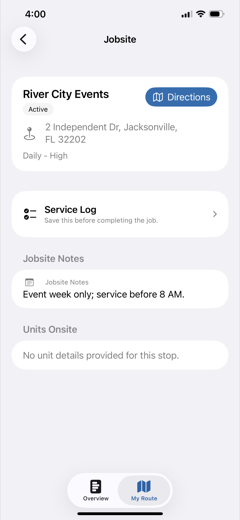
Built for daily service work
Magic Lav keeps route planning, jobsite details, truck assignments, and technician work in one shared workflow.
Group recurring service, pickups, deliveries, and repairs by day and truck.
Find customer details, addresses, units, service schedules, site notes, and jobsite status in one place.
Technicians get assigned trucks and stops without digging through message threads.
Keep inventory and truck readiness visible before drivers leave the yard.
Import customers from QuickBooks or CSV. Store accounts, jobsites, unit needs, and service details in one operating system.
Start lean, then add driver seats and fleet workflows as routes grow.
Track customer charges, payments, adjustments, and balances by billing month.
Collect quote requests through your branded request page or website form, then turn approved requests into customers and jobsites.
One shared route board
Magic Lav gives portable restroom teams a practical place to plan routes, review jobsites, assign trucks, and follow active work.
Build weekly service routes with jobsite context, unit counts, and truck assignments close at hand.
Send technicians focused stop lists with the notes and route details they need for the day.
Keep customers, jobsites, restroom units, supplies, and service activity connected as work moves.
Ready when the next route is
Card required to start your free 2-week trial. You won't be charged until day 15, and you can cancel anytime before then.
FAQ
Yes. We ask for a card to start, but you won't be charged until your 2-week trial ends. Cancel anytime before then and you pay nothing.
Yes. Magic Lav is portable sanitation software for portable toilet operators to plan routes, dispatch crews, and track units and supplies.
Magic Lav is built for portable restroom, portable toilet, and portable sanitation operators that need to schedule recurring service, manage units at jobsites, and dispatch drivers.
Yes. Magic Lav supports route schedules organized around trucks, service days, and office-dispatched stops.
That is the goal. Dispatch can build route plans in the dashboard, while technicians get a cleaner view of assigned work.
Yes. Jobsites can include customer details, address information, unit quantities, service frequency, and active job status.
Yes. The Starter plan is designed for small crews, with two driver seats included and add-on seats available as the fleet grows.
Pricing
Best for Owner-Operators
$99/mo
Best for growing operations
$129/mo
Best for Large Fleets
$159/mo
Card required to start your free 2-week trial. You won't be charged until day 15, and you can cancel anytime before then.
Features
Pro includes everything in Starter. Fleet includes everything in Pro.
Privacy Policy
Last updated: August 11, 2026
Magic Lav provides portable restroom operations software for dispatchers, owners, office staff, and field technicians. This Privacy Policy explains how Magic Lav collects, uses, shares, and protects information when you use our website, dashboard, mobile apps, and related services.
We collect account information such as name, email address, company name, business phone number, service area, authentication details, and team membership details.
We collect operational information that users enter or upload, including customers, contacts, jobsites, route assignments, service logs, repair notes, inventory records, truck details, unit records, photos or attachments, access notes, and related dispatch details.
We may collect device, app, and usage information such as app version, browser type, approximate device details, sign-in activity, error reports, diagnostics, and interactions needed to operate and secure the service.
When field workflows use maps, route planning, or stop details, Magic Lav may process location information connected to offices, jobsites, route stops, trucks, technicians, and service activity. We do not use location information for advertising.
We use information to provide account access, route planning, dispatch, jobsite tracking, field service workflows, inventory tracking, support, billing, security, fraud prevention, service reliability, analytics, and product improvement.
We may also use contact information to send transactional messages such as invites, password resets, service notices, billing notices, and support replies.
We share information with service providers that help us run Magic Lav, such as hosting, authentication, database, storage, payment processing, email delivery, maps, diagnostics, and support tools. These providers are allowed to use information only to provide services to Magic Lav.
We may share information when required by law, to protect users and the service, or as part of a business transfer such as a merger, acquisition, financing, or sale of assets.
We do not sell personal information and we do not share personal information for cross-context behavioral advertising.
Business records in Magic Lav may contain customer names, service locations, contact details, access instructions, photos, service history, and operational notes. Account owners and authorized team members control this data within their company workspace.
Users should only enter information they are authorized to manage for their company and customers.
We keep information for as long as needed to provide Magic Lav, comply with legal obligations, resolve disputes, enforce agreements, and maintain business records. Account owners may request deletion of their company account or specific personal information by contacting support.
You can update many account and company records inside Magic Lav. You may request access, correction, deletion, or export of personal information by contacting us. We may need to verify your identity and account authority before completing a request.
You can control device permissions, such as camera or location permissions, from your device settings. Some app features may not work correctly if required permissions are disabled.
We use administrative, technical, and organizational safeguards designed to protect information. No online service can guarantee absolute security, but we work to protect Magic Lav accounts and operational records from unauthorized access, loss, misuse, or alteration.
Magic Lav is a business operations service and is not directed to children under 13. We do not knowingly collect personal information from children under 13.
We may update this Privacy Policy from time to time. When we make material changes, we will update the date above and provide additional notice when appropriate.
Questions or privacy requests can be sent to support@magiclav.com.
Mobile App
Guides
Set up your operation
Start with the details your dispatcher and technicians will rely on every day.
Ready for step 2: Your jobsites have the right service requirements and arrival details.
Plan & dispatch
Open Routing and choose the week you want to plan.
Ready for step 3: Each technician has the correct truck, route, and stop details.
Service, sync & review
Your technicians capture the field work; you review the results and plan what comes next.
Keep it going: Repeat steps 2 and 3 each week, updating jobsite and team details as they change.
Support
Get help with sign-in, assigned routes, service logs, repairs, inventory, billing, and account access.
Send support requests to support@magiclav.com. Include your company name, the email on your account, and a short description of the issue.
For route or stop issues, contact your dispatcher first so they can confirm the assignment, truck, jobsite notes, and service schedule.
Company owners can request account, subscription, or billing support by email. For security, some changes may require owner verification.
For privacy, data access, correction, export, or deletion requests, email support@magiclav.com.
Magic Lav
Technician
Truck
Weekly Route
Week of
Overview
Calendar Schedule
Crapper Tracker
Route Builder
Calendar Schedule
Unassigned Jobsites
Assign new or uncopied jobsites to a selected day and truck.
MAGIC LAV / AGENT
Connect your AI agent to Magic Lav to help add jobsites and customers, find records, manage routes, and dispatch work to your trucks.
Send this link to your AI agent to get started.
| Time | Agent | Action | Record | Result |
|---|
Supplies
Intake
AI Import
Magic Lav can help format your customer records for you. Upload your existing records file, or QuickBooks file and Magic Lav will prepare it for your review before anything is saved.
For the most accurate import, use these columns when preparing your file.
customer_name, customer_address, customer_contact_name, customer_phone, jobsite_address, jobsite_latitude, jobsite_longitude, service_frequency, weekly_service_count, status, priority, notes
Every template column must stay in the CSV. Each imported row must include customer_name and jobsite_address; other blank cells use defaults or stay empty.
Use one physical jobsite address per row. Include city, state, and ZIP when available. If coordinates are provided, include both jobsite_latitude and jobsite_longitude.
Blank service_frequency becomes Weekly, blank status becomes Active, and blank priority becomes Normal. weekly_service_count is only used for Multiple times a week.
For customer:subcustomer rows, keep the parent as customer_name and use the subcustomer text as the jobsite address or label. Review AI-formatted data before importing.
Account
Fleet Controls
Set the technician requirements for when photos should be attached at the jobsites.
Saved Office
Saved Sewage Collection
Fleet
Truck Assignments
Intake
Data
Download customer and jobsite records or clear them from this account.
Danger Zone
This clears customers, jobsites, service logs, and repair logs. Team, trucks, units, inventory, locations, settings, schedules, and billing stay in place.
Plan